Download the popular MT4 platform on your iOS device for seamless access to your account anytime, anywhere.

Trade effortlessly across thousands of markets, set price alerts to capitalise on trading opportunities and monitor your trades while you’re on the go.

Jeder Handel ist mit Risiken verbunden. Es ist möglich, dass Sie Ihr gesamtes Kapital verlieren.

Warum MT4 von Xlence für iPhone/iPad wählen?

With Xlence’s MT4 trading platform for iOS, you can access your MT4 account on your iPhone using the same username/password you use to access your account on your personal computer or Mac.

Genießen Sie Funktionen wie eine 100 % native iPhone-Anwendung, volle MT4-Kontofunktionalität und ein Handelsjournal.

Erleben Sie die beliebteste Handelsplattform auf Ihrem Mobiltelefon, jederzeit und überall.

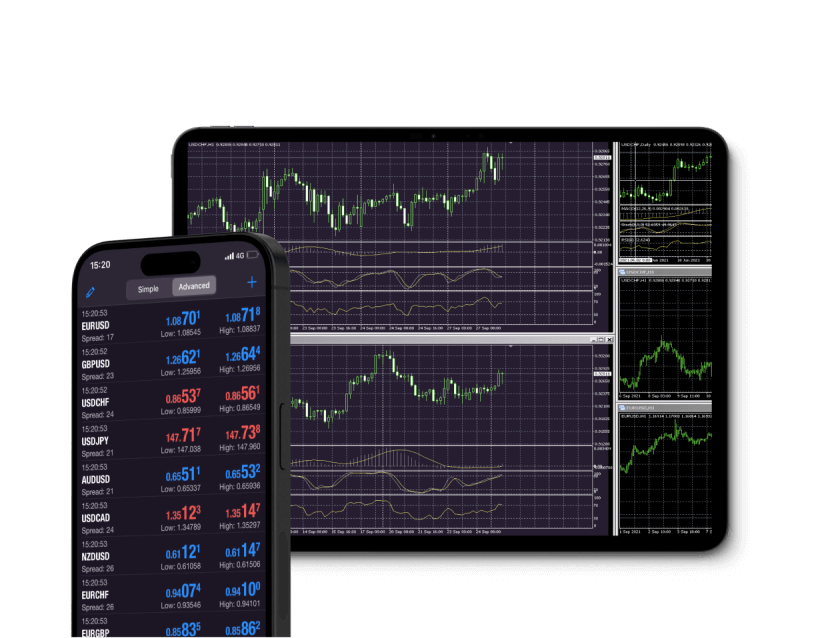
Mobile forex trading on MetaTrader 4 for iOS, showcasing charts and trading options on a smartphone screen.

MetaTrader 4 herunterladen für iPhone/iPad iOS

Trade Forex on the go via MT4, the most functional platform for iOS devices.

Place orders with ease, stay up-to-date with market rates and access Forex charts with a real-time news feed and additional features to enrich your trading experience.

MT4 wird von Windows, Mac OS, iPhone/iPad, Android und jedem Internetbrowser unterstützt.
Forex trading app MetaTrader 4 open on an iOS mobile phone, featuring live market updates and trading options.

Features of MT4 for iPhone/iPad

A fluctuating line graph from MetaTrader 5, showing variable trends in data over time.

Vollständige Kontrolle über ein Handelskonto

Three distinct candlesticks in various colors on a white background, symbolizing futures.

Verwalten Sie Aufträge, Positionen und Aktien online

Circle featuring a gear and a star, representing MetaTrader 5's customizable interface and cross-platform capabilities.

Alle Auftragsarten und Ausführungsmodi

A white and gold circle crossed by a line, indicating a disabled option in the MetaTrader 4 Android app.

3 Arten von Diagrammen: Balken, japanische Leuchter und gestrichelte Linien

How to log in to MT4 for iOS

Stylized number one with a solid gold shape and a dotted outline, symbolizing ranking, performance, and leading shares

Laden Sie die MT4-Handelsplattform für iOS herunter und installieren Sie sie.

A stylized number three in white and gold, surrounded by a circle, indicating shares

Wählen Sie Xlence als Ihren Broker aus.

A minimalist design with a white backdrop and the number four clearly centered, conveying a sense of simplicity.

Geben Sie Ihre Anmeldedaten für das Echt- oder Demokonto (Benutzername und Passwort) ein, die Sie von Xlence in Ihrer Willkommens-E-Mail erhalten haben.

The number five featured on a white background, symbolizing MetaTrader 5 for Android platforms.

Beginnen Sie mit dem Trading.

For more information on the MT4 platform for iOS, visit our FAQ page.
White and gold light bulb icon on a white background, representing the MetaTrader 4 iOS guide.

MT4 iOS user guide

Lesen Sie das Benutzerhandbuch für Anweisungen zum Herunterladen, Installieren und Verwenden der MT4-Plattform für iOS.

The new Apple MTM book features a purple and gold design, serving as a user guide for MetaTrader 4 on iOS.
Vielen Dank für Ihren Besuch bei Xlence!

Diese Website richtet sich nicht an im Vereinigten Königreich ansässige Personen und ist weder an den MiFID II-Rechtsrahmen noch an die im Handbuch der britischen Finanzaufsichtsbehörde (Financial Conduct Authority) festgelegten Regeln, Leitlinien und Schutzmaßnahmen gebunden.

Wenn Sie weiterhin Zugang zu Xlence wünschen, klicken Sie bitte unten.

Vielen Dank für Ihren Besuch bei Xlence!

Diese Website richtet sich nicht an Personen mit Wohnsitz in der EU und unterliegt nicht den europäischen und MiFID II-Vorschriften.

Wenn Sie trotzdem zu Xlence gehen möchten, klicken Sie bitte unten.

This site is registered on wpml.org as a development site. Switch to a production site key to remove this banner.